Just released the
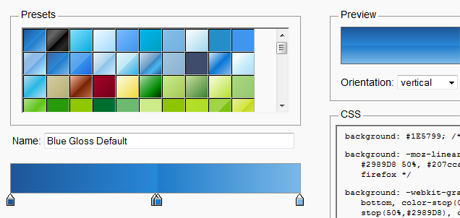
Ultimate CSS Gradient Generator – it’s a powerful online Photoshop-like CSS gradient editor that will output cross-browser HTML5 / CSS3 gradients and will complement the
ColorZilla set of color tools.
As you might know,
HTML5 introduced many exciting features for Web developers. One of the features is the ability to specify gradients using pure
CSS3, without having to create any images and use them as repeating backgrounds for gradient effects.
A few features in this first version of Ultimate CSS Gradient Generator:
- A convenient ‘presets’ panel for pre-selecting a wide variety of gradients.
- A gradient editor control that allows adding and removing stops, changing their color and position etc.
- ‘Preview’ panel allows previewing the current gradient as a vertical or horizontal one, and also allows quickly previewing how the Internet Explorer fallback gradient will look in IE.
- ‘CSS’ panel always has the CSS for the current gradient for easy copying and pasting into your stylesheet.
Check it out and let me know what you think
Important: You’ll need a recent version of Firefox, Chrome or Safari to use this Gradient Generator. The resulting CSS gradients are cross-browser – they will work in these browsers and will also fall back to a simpler gradient in Internet Explorer.
The CSS Gradient Generator will also be included in the latest version of
ColorZilla.
Credits: The ‘Ultimate Web 2.0 Gradients’ preset gradients were derived from the great work by deziner folio and SGlider12 (their work was released under Creative Commons Attribution-ShareAlike license). The Color Picker is a minor adaptation of John Dyer’s awesome Color Picker.
Source:
iosart blog
salam gaptek...